/
Edit UI User Details
Edit UI User Details
- Peter Humphries (Deactivated)
- Shea Johns (Deactivated)
Owned by Peter Humphries (Deactivated)
Last updated: Mar 18, 2021 by Shea Johns (Deactivated)
menu
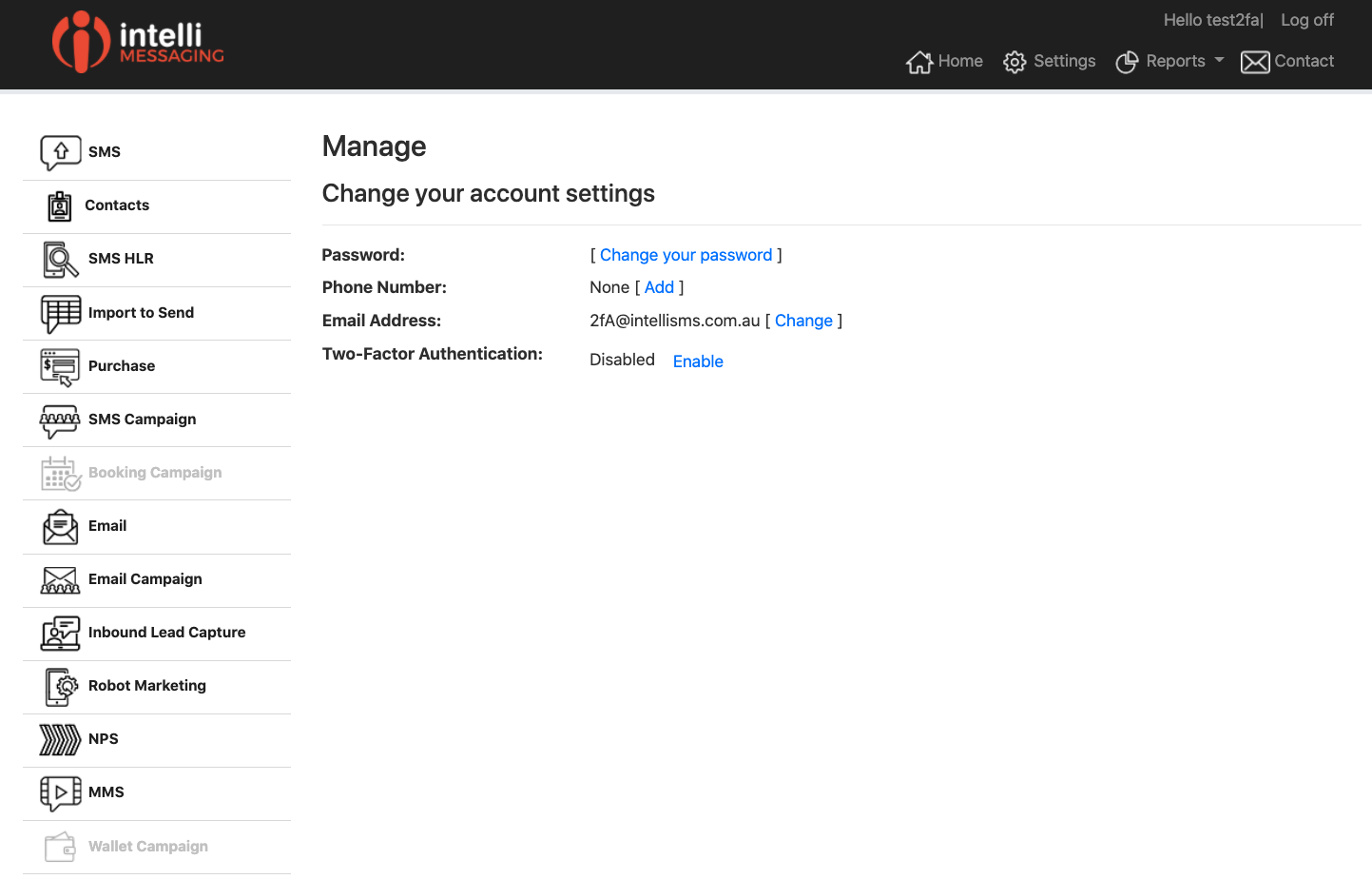
Click on your username where it says "Hello [Your Username]!" top right of the window.
Screen Shot
Actions
| Link | Description |
|---|---|
| Change your password | Select this link to change your password. This changes only your password for the UI access. |
| Phone Number (Add) | Use a mobile phone number as this is used for Two Factory Auth where you will be sent a text with a code for entry into the UI at login. If you edit or add your phone you will be sent a text for a code for confirmation. If you do not enter this code your phone number will not be confirmed. |
| Email Address (Change) | Allows you to change your email address. You will be sent a email for confirmation - your email address will not change until it is confirmed. |
| Two-Factory Authentication (Enable) | This enables two factor authentication - the process will not work if you do not have a confirmed email address or phone. |
, multiple selections available,
Related content
Email Campaigns
Email Campaigns
Read with this
Import To Send SMS
Import To Send SMS
Read with this
HLR - Mobile Number Lookup
HLR - Mobile Number Lookup
Read with this